Tag Archives: speed

Web video sizing

I have been getting more and more interested in video work in the last couple of years.  Shooting video at the same time as stills is a regular feature of any shoot I am now on.  I am even getting better at planning my shot requirements for the video in order to have some hope of putting together a relatively coherent piece later.  The recent ISAP symposium had some good information on that.  However, that is not the point of today’s piece.  Instead, I am thinking about video size.

I have a YouTube channel on which I upload my content.  As s shameless plus, if you want to check it out, go to http://www.youtube.com/user/EdgcumbePhoto and you can see the videos I have previously uploaded.  Subscribe if you want and it will let you know about all of the exciting new videos I upload!  Okay, we return from that commercial break and resume normal programming.  I shoot everything in HD and edit the footage for 1080p output.  This can result in some quite large files.  YouTube allows you to upload full 1080p so that is what I have been doing.

Unfortunately, our current internet connection is not helpful here.  While we have pretty decent download speeds, the upload speeds are very slow.  DSL was not designed for upload and consequently, the upload speeds have not kept pace with the download speeds and the needs of users generating more and more content.  A recent video I made was about eight minutes long.  The 1080p version of this was nearly 2Gb.  Uploading this took over a day!!!

Now, when I watch videos on YouTube, what resolution do I watch them at?  I certainly like HD footage but I only ever use 720p.  This is a combination of avoiding bandwidth issues as well as the size of my monitors.  There really is no need to be any larger.  I wonder whether this is normal.  I started looking at what is available on other videos I was watching and quite a few only go to 720p.  I thought a quick experiment was in order.  The eight minute video I mentioned before can easily be regenerated at 720p so I did that.  The file size came out to just over 300Mb.  That is a pretty dramatic reduction in file size and upload time.

I think I have been wasting time and bandwidth creating files too large for anyone to need.  I am going to stick with 720p for a while and see how things work out.  We might have access to a different net connection before too long and I might check out upload speeds then but, for now, this seems to be a far more sensible approach.

Night flight

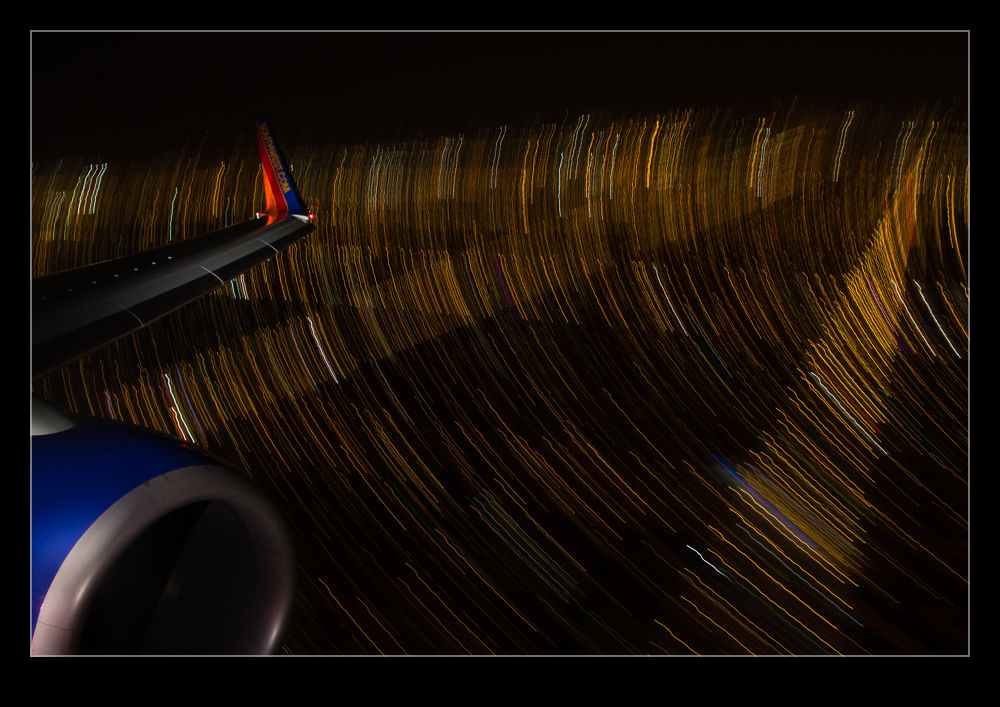
A recent flight home meant an arrival into Midway a while after the sun had set.  I had been taking some pictures out of the window as we headed back across the country and decided to try my luck after dark.  I had thought about trying out some auto ISO shots as I described in a previous post.  However, since I was shooting night scenes, the camera does its best to try and make things look properly exposed and this is not what you need.  Instead, I had to manually set the ISO to a higher number and then drop the exposure compensation to between -2 and -3.

The shots came out okay but they weren’t terribly interesting.  However, as we got lower, I decided to go for something a bit more interesting and slowed the shutter speed down dramatically.  I braced the camera against the window frame and decided to see what sort of light trails I could get.  The exposures were a couple of seconds or more so this is rather tricky.  While the background is blurred deliberately, I had the top of the engine and the winglet in for reference.  Avoiding blurring them was more hit and miss.

I tried a bunch of shots and was pleased with the number that came out well.  However, the effect only seems to work in a couple of situations.  One is a turn.  This puts more ground lights in the frame and turns everything into a nice curve.  The other is when you are very low at which point everything is moving past you close and fast.  I might try this again before too long but will have to ponder what might improve things.  One technique issue I was pleased with was remembering to turn off image stabilization.  With long exposures, it causes the image to wander so, when bracing, it actually makes things worse.  Unlike me to remember that first time out but sometimes I do get lucky!

Auto ISO

There is a function built in to my cameras that, until recently, I had never bothered to use.  It hadn’t been something that immediately grabbed my interest and so I had forgotten about it to some extent.  Therefore, when it could have been useful to me, I had not thought about how to make good use of it.  This is Automatic ISO.  This is an interesting idea when you start to think about it in more detail and one that might cause some to react in strange ways.

Many photographers will react poorly to the camera doing anything automatically.  They will say how they like to have control.  Then they will totally contradict themselves by telling you that they always shoot in aperture priority mode, totally ignoring the fact that the camera set the shutter speed for them in this mode “automatically”!  Therefore, for anyone reading (is anyone reading?) who jumps to the “I am against automatic anything” approach, why don’t you go and analyze exactly how your camera works and you use it.  If you are totally manual in everything you set, congratulations.  You obviously don’t need to read this anyway.

For anyone else who is a little more open-minded and who hasn’t played with this capability, let me explain why I tried it.  Plenty of times I have the camera in aperture priority in a situation where it is quite dark.  I know this is not clever of me but I often notice that the shutter speed is low because I can hear that it is!  In situations like this I might then tweak the ISO setting to try and bring things back into a range I am comfortable with.  My technique for this is rolling the dial a bit and seeing what I get.  Not clever analysis by any stretch.

Recently I was shooting a job in natural light (or lack thereof) that started long before the sun came up.  I knew I was going to be using some pretty high ISO settings to get useable shots and this is when the auto ISO function came to mind.  I went to manual mode, set the aperture and shutter speed I wanted and switched ISO to A.  Now, it worked out what was needed to get the exposure right.  As the light conditions improved, the ISO got dialed down but I didn’t have to do anything other than find what I wanted to shoot, compose and get on with it.  The only limitation I had was that I don’t know how (or even if) you can add exposure compensation in this situation.  Something for me to research – maybe even take the dreaded step of reading the manual!

The results were very satisfactory.  I got the images I wanted and didn’t have to constantly wonder about whether my ISO setting was right.  Obviously, this is not a solution for every situation but it does provide a good approach in some conditions.  Maybe you will have a time when it is worth a go to.